



 01
01 Case 01
Order Import Preflight
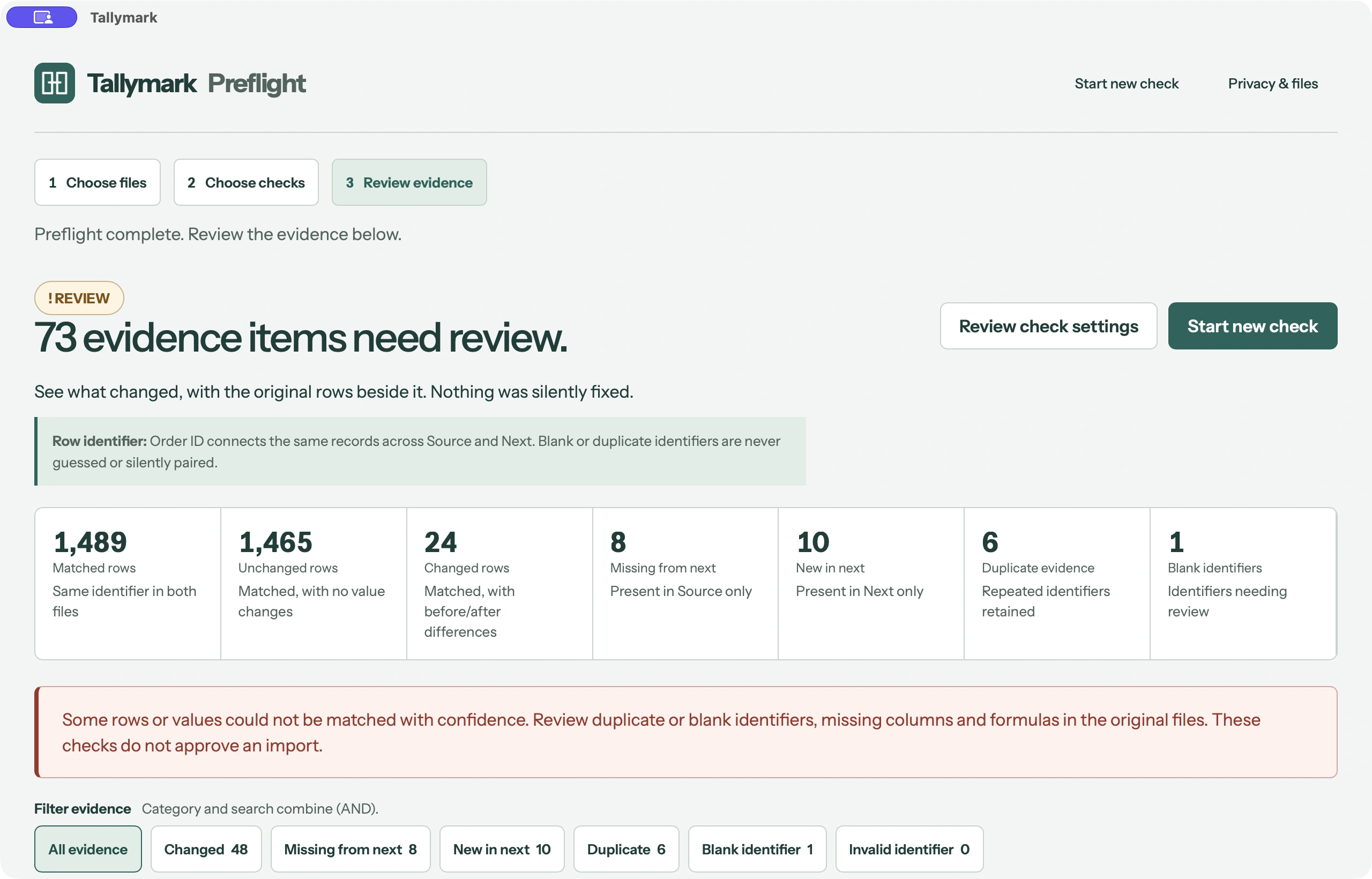
Change Check compares two synthetic commerce exports before an import. The stable identifier is Order ID on the Orders sheet.
- Changed
- 24
- Missing
- 8
- New
- 10
- Duplicate evidence
- 6
- Blank identifier
- 1

Compare two spreadsheets. Match the records. Review the changes with exact row evidence before the next handoff.
Real software. Synthetic sample files. A closer look before release.
Orders, supplier catalogs, invoice registers. Complex synthetic files, reviewed in the actual native app. The numbers below come from the demonstrated comparisons.
01 Change Check compares two synthetic commerce exports before an import. The stable identifier is Order ID on the Orders sheet.
 02
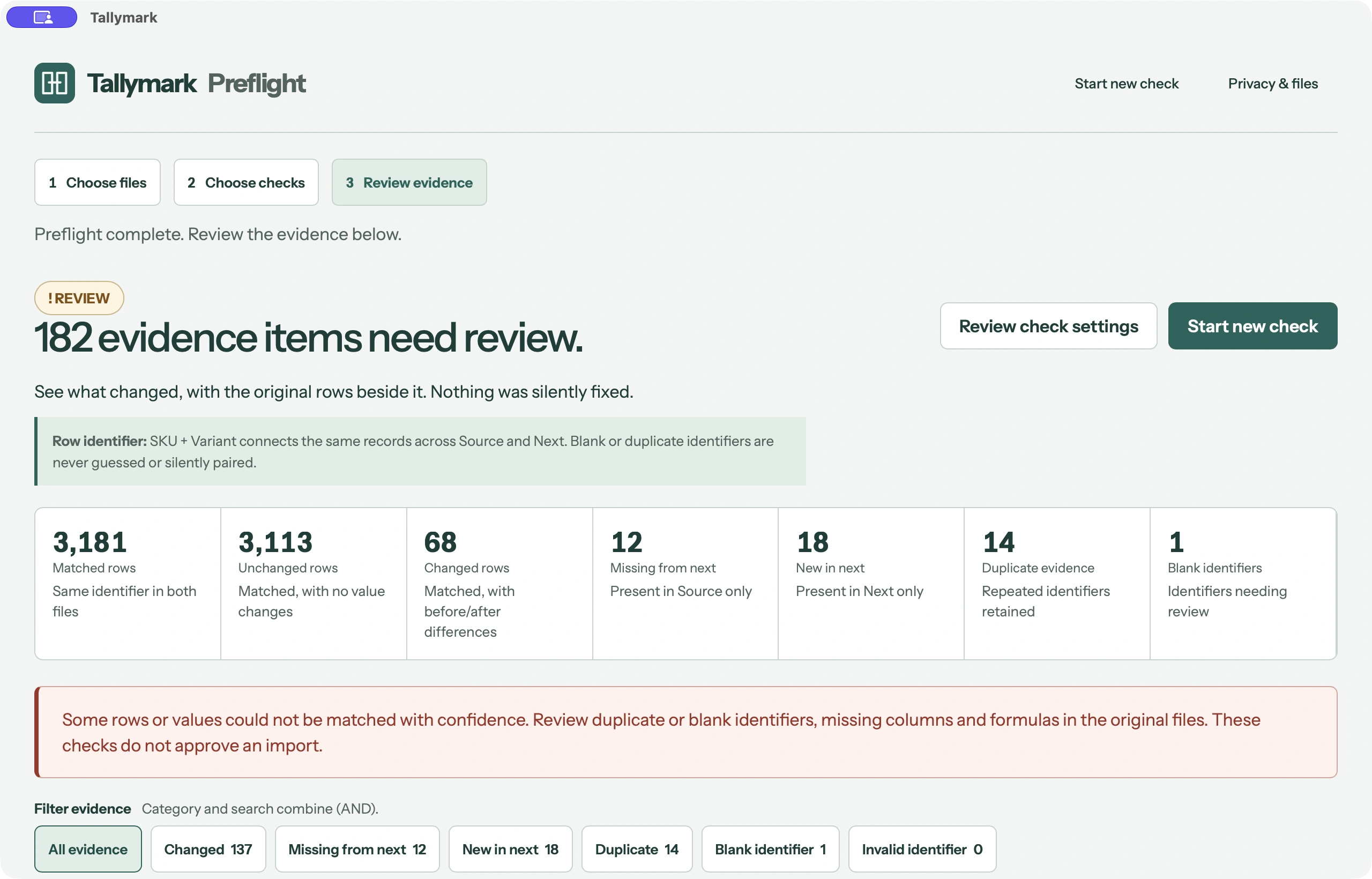
02 Change Check compares a synthetic multilingual supplier catalogue using the composite identifier SKU + Variant on the Catalog sheet.
 03
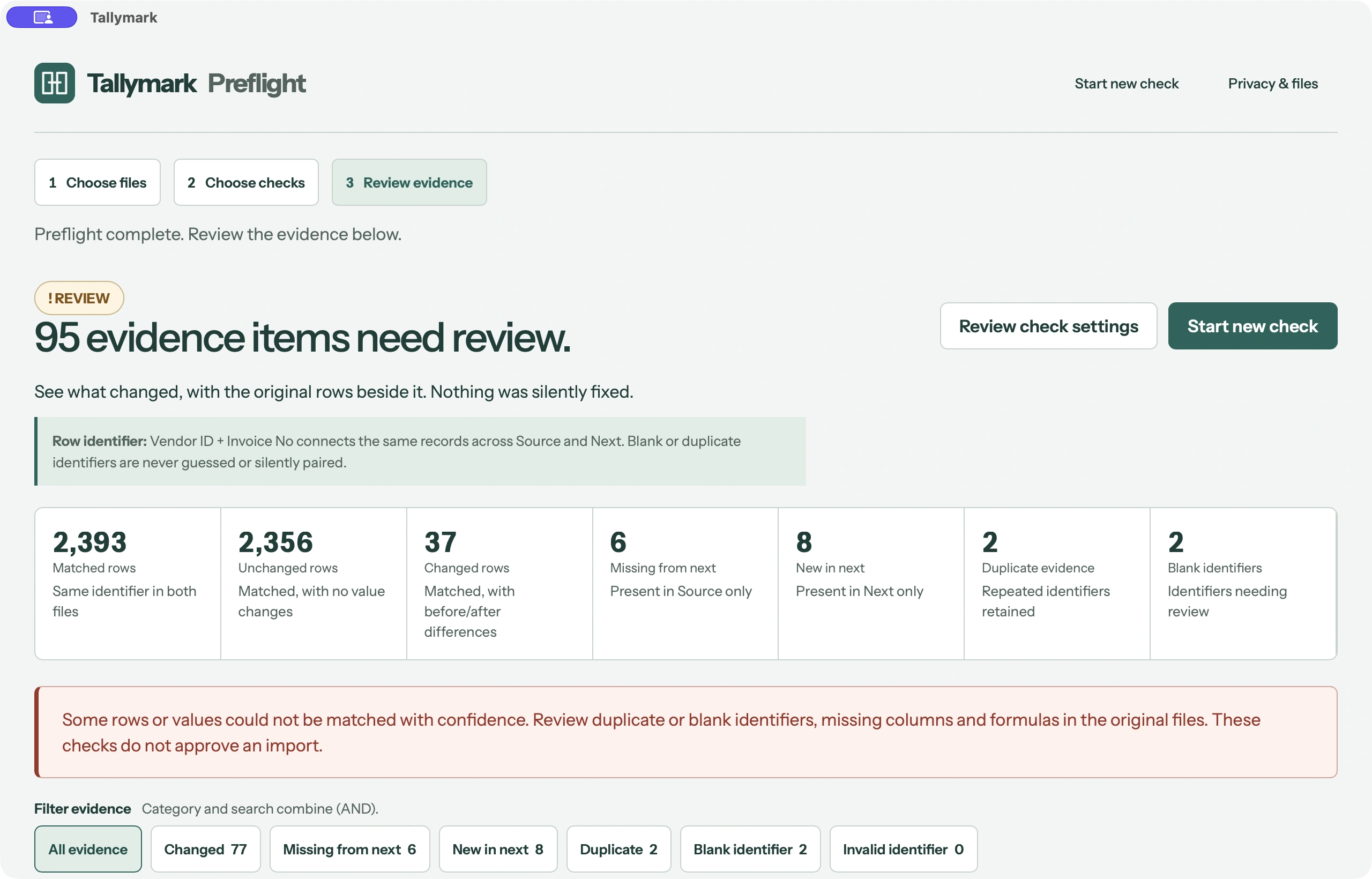
03 Change Check compares a synthetic multi-sheet invoice register. The selected comparison sheet is Invoices, using Vendor ID + Invoice No as the composite identifier.
Counts show the default comparison. Order Import finds 24 changed rows by default, or 25 with exact letter case. Duplicate counts describe evidence items.
Match Orders by Order ID. Review fulfillment changes and notes, then inspect missing and new records before the next import.
Letter case matters when you choose it. The default run finds 24 changed rows. Exact case finds 25: Paid → paid becomes a change.
Explore the full caseUse SKU + Variant to identify each product variation. Review Cost and Note changes across a multilingual catalog, with duplicate and blank identifiers kept visible.
A small number can be intentional. The sample changes Cost from 100.00 to 100.01. Set number tolerance to 0.02 to treat that difference as within tolerance.
Explore the full caseSelect Invoices in a multi-sheet workbook and match Vendor ID + Invoice No. Inspect Total, Outstanding, Approval Status, Notes and Paid Date with both file locations in view.
Keep the sheet selection explicit. The workbooks also contain Payments and Reference; Next adds Notes. Review formula-related evidence in review mode and export a separate report.
Explore the full caseThe record, the field, both values and exact Source and Next rows. Check what happened without hunting through two spreadsheets.
Review a changed value or the complete context of a missing or new row.
Ambiguity stays visible for human review.
Match a record using more than one column.
Whitespace, letter case, number tolerance, date modes, and empty or missing cell behavior.
Column names can be different, but the values must identify the same records.
Order ID ↔ Order Number
ORD-1001 ↔ ORD-1001Order ID ↔ Product
ORD-1001 ↔ Coffee GrinderSearch identifiers, keys, columns, and before or after values. Combine a category with a search to narrow the evidence you review.
In the supplier demo, search Note to inspect changes in that column. Search refines the visible evidence; it does not change the underlying comparison.
Export a separate CSV or human-readable XLSX Review Report. Keep Summary, Changed, Missing, New, Duplicate and Blank identifier evidence together for the next person.
Excel is great for working with spreadsheets. Change Check is for checking one spreadsheet against another before you trust it.
| The job | Excel / formulas | Change Check |
|---|---|---|
| Reordered rows | Set up lookups | Match by identifier |
| Composite identifiers | Build a helper key | Choose multiple columns |
| Missing / New | Check both directions | Separate categories |
| Duplicates | Add validation | Review ambiguity |
| Exact row evidence | Track row references | Source + Next rows |
| Review report | Assemble a review sheet | Export CSV / XLSX |
The older file is Source. The incoming file is Next.
Select a stable identifier, or combine multiple columns.
Run Preflight. Inspect the evidence and export your report.
Download the beginner sample now and follow the guide. The app itself is preparing for public release.
A focused check for the moment before an import, update, or handoff.
Intended launch price. Public purchase is not live.
Final license, update and purchase terms will be published before launch.
Data rows per selected sheet. CSV and XLSX, including mixed pairs. Larger selections stop with a limit message.
Change Check does not overwrite your Source or Next spreadsheets. Reports are saved separately.
Public release is coming. Windows is not yet publicly verified. A complete product privacy policy and requirements will be published before launch.
Designed for local spreadsheet processing. We are not yet making a verified promise that files never leave your computer.
A spreadsheet preflight tool: compare two CSV or XLSX files and review differences before importing or handing them off.
Source is your reference file, usually the older version you want to compare against.
Next is the incoming or newer file you want to check against Source.
A value that identifies a record, such as Order ID. It lets Change Check match records even when rows have moved. Review duplicate or blank identifiers separately.
Yes. Order ID and Order Number can match when their values identify the same records.
Those values describe different identities. Review the compatibility warning and choose columns that identify the same records before continuing.
Yes. Combine columns such as SKU + Variant or Vendor ID + Invoice No to identify a record.
Search identifiers, keys, column names, and before or after values in the evidence. Combine it with a category filter.
It lets you treat small numeric differences as within tolerance. In the supplier sample, 100.00 → 100.01 falls within a tolerance of 0.02.
Choose whether uppercase and lowercase differences count. In Order Import, exact case counts Paid → paid as a change: 25 changed rows versus 24 by default.
The option controls how whitespace is compared. The order example ignores surrounding whitespace so extra spaces around values do not become changes.
The current version supports up to 10,000 data rows per selected sheet. Larger selections stop with a limit message instead of producing a partial comparison.
No. It does not overwrite Source or Next. Exported reports are separate files.
CSV and XLSX, including CSV ↔ CSV, XLSX ↔ XLSX and mixed CSV ↔ XLSX pairs. For multi-sheet workbooks, select the sheet to compare.
The planned Change Check launch price is US$19 once. Public purchase is not live. Final license and update terms will be published before launch.
Mac comes first. Windows has not yet been publicly verified and is not available here.
Not yet. The Mac pre-release has been reviewed by the founder. Public download and purchase are coming later.
No. Checkout and license activation are not live. The Get Change Check button explains the upcoming release.
It is the intended one-time launch price, not a live offer. Final purchase terms will be published before payment opens.
Up to 10,000 data rows on each selected sheet in the current version. This is not an unlimited workbook or platform claim.
No. It provides evidence for your review. You decide whether the next file is ready.
The recordings and screenshots come from the real native Mac app. All example workbooks use synthetic data; they are not customer stories.